
Windows Server Administration Course – Certification and Practical Training
The comprehensive and job-oriented Windows Server Administration course by Rexton IT Solutions covers key fundamentals and focuses on developing advanced practical skills. Completing this course will get you job-ready and will additionally prepare you to manage enterprise-level IT infrastructures efficiently. Overall, our expert-designed Windows Administration Course will guide your career in the right direction, ensuring optimal growth.
Enroll Now

Book A Demo Class
Why Is This Windows Administration Course Different?
We offer the best Windows Server course, designed by industry experts with significant real-life experience. While beginner-friendly, this course also includes complex advanced topics that are presented in simplified form to maximize learning. Highlights of the Windows Servers Administration course by Rexton IT Solutions include:
- Placement and Job Opportunities – Give your career a significant boost with our placement drives and get career guidance from experienced faculty
- Job-oriented Learning – Learn how to apply theoretical knowledge to real-world problems for hands-on experience
- 1-on-1 Training – Our personalized 1-on-1 doubt sessions will help you cover complex Microsoft technologies
- Mock Interviews – Prepare for tough technical interview rounds
- Revision Support – Get free lifetime access to course materials – video lectures and sources
- Hands-on Experience – Work on real-world projects with modern automation tools
- Online Classes : Access pre-recorded courses and live classes from your phone, tablet, or pc from anywhere with convenience. Ideal for students or full-time working professionals.
- Offline Classes : Join us at our offline facilities for interactive lectures and get access to advanced labs for technical training
- Personal Doubt Sessions : Learn complex Windows environment concepts with 1-on-1 training, where you can freely ask all your doubts
- Lay a firm foundation for advanced learning with comprehensive learning.
- Lectures from experienced faculty members with significant industry experience.
- Technical training and real-world projects to build a stronger resume.
- Advanced labs with trained lab assistants.
- An organizationally recognized certificate.
- Career guidance and frequent placement drives.
Why Choose Rexton IT Solutions for Windows Server Training Online
Rexton IT Solutions is the best Windows Server course provider with high placement rates and trained faculty members. Moreover, we focus on personalized learning with self-paced lectures and doubt sessions. Here is why we stand out from the rest:

Full-time customer support for our candidates.
Advanced physical and virtual labs.
Transparent pricing and affordable learning.
Lectures that cover AI, automation, and other modern development tools.
Creative environment for innovative learning.
Flexible lecture timing and pre-recorded online lectures for your convenience.
Training Features

1-on-1 Training
Clear All Your Doubts

Flexible Learning
Online and Offline Classes for Self-paced Learning

Mock Interviews
Complete Preparation for Technical Interview Rounds

Placement Support
Start and Grow Your Career with Us
Job-Oriented Learning
This Windows Server Administration course will save you time by reducing the need to spend additional time on job preparation. Consequently, you can apply for jobs as soon as the course ends. Modern recruiters prefer candidates with hands-on experience and practical skills. With Rexton IT Solutions, you will fit their requirements and ensure your resume includes all relevant skills.
Gain critical insights into complex topics with Rexton IT Solutions!
Who Can Enroll in our Windows Server Training Course
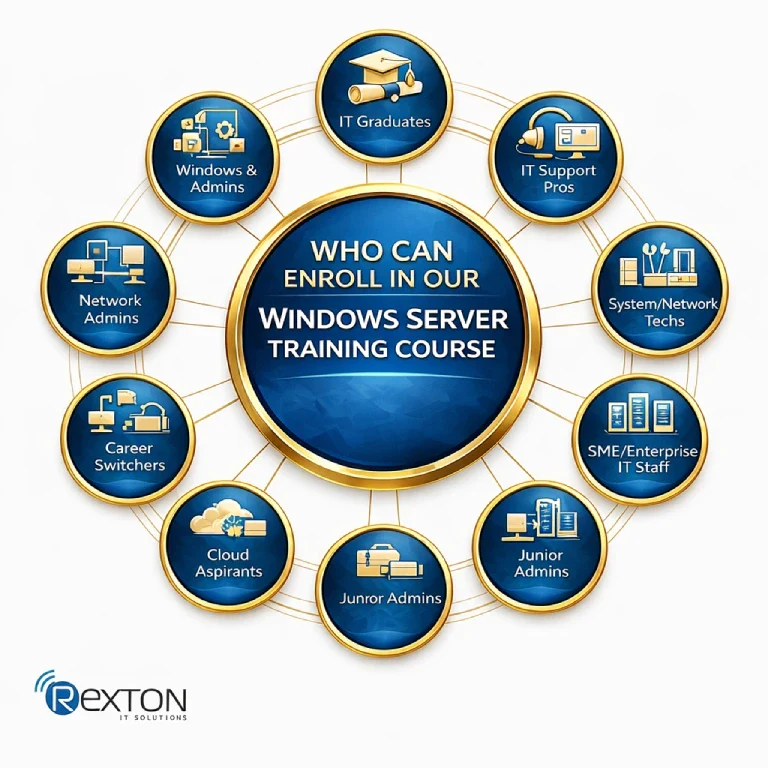
This Windows Server Administration course is ideal for both beginners looking for an entry-level job and professionals looking to advance their careers. Who can and who should enroll in this course are mentioned below:
- Fresh graduates from IT, CS, or related fields
- Diploma holders in computer networking or hardware
- IT support/help desk professionals
- System or network technicians
- Career switchers moving into IT infrastructure roles
- Anyone with basic computer and networking knowledge
- Aspiring System Administrators aiming to manage enterprise Windows servers
- IT support engineers looking to move into server-level administration
- Network administrators wanting stronger Windows + Active Directory skills
- Cloud aspirants planning to work with Azure and hybrid environments
- Junior admins seeking hands-on experience with real server setups
- Professionals preparing for Microsoft-aligned certifications
- SME / enterprise IT staff handling on-premise Windows infrastructure
Getting Started
This course is designed to help you build practical knowledge and develop industry-relevant skills through a structured learning path.
You’ll gain access to:
- Comprehensive learning modules
- Practical exercises and real-world examples
- Downloadable resources and reference materials
- Assessments to evaluate your progress
Whether you’re a beginner or looking to enhance your expertise, this course provides everything you need to learn at your own pace and achieve your goals.

Prerequisites to Enroll in the Windows Server Administration Course
There are no strict prerequisites to enroll in the Windows Server Administration course. You do not need any academic qualifications or a diploma to take this course. However, there are a few requirements that will ensure a smoother learning curve:
- Basic computer knowledge (Windows OS, files, folders, system settings)
- Fundamental networking concepts
- IP address, subnet, DNS, DHCP
- LAN, WAN, basic troubleshooting
- Understanding of the Windows desktop environment
- Ability to work comfortably with PC/laptop systems
- Basic IT support or help desk experience
- Familiarity with Active Directory concepts (users, groups, permissions)
- Basic knowledge of virtualization (VMs, Hyper-V, VMware)
- Introductory PowerShell or command-line usage
| Certification / Exam | Exam Code | Primary Focus Area |
|---|---|---|
| Windows Server Hybrid Administrator Associate | AZ-800 | Core Windows Server administration (on-premises & hybrid) |
| Windows Server Hybrid Administrator Associate | AZ-801 | Advanced Windows Server, security, high availability, migration |
| Azure Administrator Associate | AZ-104 | Azure infrastructure, virtual machines, storage, and networking |
| Identity and Access Administrator Associate | SC-300 | Identity management, access control, Azure Active Directory |
| Endpoint Administrator Associate | MD-102 | Windows client and endpoint management |
| Azure Security Engineer Associate | AZ-500 | Azure security controls, identity, and workload protection |
| Azure Network Engineer Associate | AZ-700 | Azure networking, connectivity, and hybrid networking |
- Module 1 : Plan for Windows Server – Installation Requirement and Edition Per Workload, Install and Configure Windows Server, Install and Configure Windows Server Core, Manage Windows Server Core.
- Module 2 : Introducing and Installing Active Directory – What is Active Directory?, What’s New in Active Directory?, Installing Active Directory, Installing a New Tree or Child Domain.
- Module 3 : Active Directory Management Tools and Read-Only Domain Controllers – Active Directory Management Tools, Installing AD DS Management Tools, Read-Only Domain Controller Overview, RODC Installation and Configuration.
- Module 4: Domain Controllers in Azure and Flexible Single Master Operation – Domain Controllers in Azure. Flexible Single Master Operations, Transfer a FSMO Role, Seize a FSMO.
- Module 5: Manage User Accounts and Join Computers to a Directory – User Accounts, Edit a User Account, Automate User Account Creation, Limitations of Joining Computers to AD, Use Commands to Join a Domain.
- Module 6: Managing Groups in Active Directory – Introducing Active Directory Groups, Default Active Directory Group Accounts, Group Scope, Use PowerShell to Manage Groups, Implement Group Managed Service Accounts.
- Module 7: Domain/Trust Relationships – Domain Relationships, Trusts and Direction, Create a Trust, Verify a Trust, and Selective Authentication.
- Module 8: Active Directory Sites and Replication – Intrasite Replication, Intersite Replication, Advanced Site Configuration.
- Module 9: Implementing Group Policy – Create and Manage Group Policy Objects (GPOs), Configure Group Policy Processing, Configure Group Policy Settings, Configure Group Policy Preferences, Manage Group Membership Using Group Policy, Configure Group Policy Software Deployment, Folder Redirection – Scripts, WMI and Security Filtering, Group Policy Preferences.
- Module 10: Implement the Azure AD Connectors – Introducing Azure AD Connect, Synchronize the Azure AD Connect Tool, Password Hashes, Azure AD Connect Health, Synchronization Service Manager, Implement Azure AD Connect Cloud Sync
- Module 11: Integrate AD DS, Azure AD, and Azure AD DS – Integrate AD DS, Azure AD, and Azure AD DS, Why and When to Use Azure AD DS, Deploy the Managed Domain in Azure, Configure VNet DNS Settings, Join an Azure VM to the Managed Domain, Remote Server Admin Tools, Fix Azure AD Connect, Other Security Considerations for Azure AD DS, Summarize Azure AD DS Integration.
- Module 12: Manage Windows Servers in a Hybrid Environment – Manage Windows Servers in a Hybrid Environment, Windows Admin Center, Installing Windows Admin Center Gateway, Adding Servers to Windows Admin Center, Configure PowerShell Remoting.
- Module 13: Monitor and Manage Windows Server 2022 – Introducing Windows Server Monitoring and Management, Install Windows Admin Center, Add Inventory to Windows Admin Center, Connect WAC to Azure, Manage Servers from WAC, PowerShell Remoting, Kerberos Constrained Delegation, Summarizing Windows Server Management.
- Module 14: Manage Windows Servers and Workloads by Using Azure Services – Manage Windows Servers and workloads by using Azure services, using Azure Arc to Manage Servers, assigning Azure Policy to an Azure Arc Server, installing Log Analytics Agent on Arc Servers, and implementing Azure Automation on Arc Servers.
- Module 15: Hyper-V Installation and Plan for Virtualization – Microsoft assessment and planning toolkit, Hyper-V requrement and Install Hyper-V, Configure and Remotly Manage Hyper-V, Create Virtual Machines – Deligate VM, Impliment Nested Virtualization, Configure Virtual Machines – Dynamic Memory – NUMA – Smart Paging – Resource Metering, Manage Virtual Machines – Add Remove Memory VM – Enhance Session Mode – DDA – Import Export VM, Move And Convert VM From Previous Version of Hyper-V, Create and Configure Hyper – V Storage VHD – VHDX – Shared VHD – Thin and Thik Disk – Pass-Through – QOS, Manage Hyper-V Storage – Modify and resize VHD – CheckPoint – Fiber Channel Adaptor, Configure Hyper-V Networking – Virtual Switch – Add remove NIC – Synthetic and Legacy Adaptor – MAC Address – Configure Network Isolation, Optimize Hyper-V Networking – Bandwidth Management – VMQ – Optimize Network Performance – RDMA, Implement Hyper-V Replicaion, Implement Hyper-V Migration.
- Module 16: Manage Azure VMs that Run Windows Server – Manage Data Disks, Resize Azure VMs, Resize Azure VMs with CLI, Continuous Delivery for Azure Virtual Machines, Configure Connections to VMs – RDP and SSH, Configure Connections to VMs – Bastion, Network Summary.
- Module 17: Implement Windows Server DHCP – DHCP Overview and Install, DHCP Scope Creation, DHCP Reservations, DHCP Options, DHCP Policies, DHCP Super and Multicast Scopes, DHCP L2 MAC Filtering, DHCP User Classes, DHCP Dynamic Updates to DNS, DHCP PXE Boot Support, DHCP Backup, Restore, Import, Export, DHCP Failover, DHCP Split Scopes, DHCP Troubleshooting, DHCP Relay Configuration.
- Module 18: Implement DNS on Windows Server 2022 – Adding the DNS Server Role, DNS resolving and Queres, DNS Root Hints, DNS Zones Overview -DNS Stub Zones, DNS Records Overview, DNS Scavenging, DNS Forwarding, DNS Delegation, DNS Round Robin, DNS Recursion, DNS Security (DNSSEC), DNS Cache Locking and Socket Pool, DNS Response Rate Limiting, DNS Policy: Load Balancing, DNS Policy: Client Source Address, DNS Policy: Time-based Requests, DNS Logging and Tuning, DANE and TLSA Records, Adding Active Directory (AD), DNS GlobalNames Zone, Troubleshooting DNS.
- Module 19: Implement and Manage IPAM – Introducing IPAM, Install and Set Up IPAM, Manage DHCP, and Manage DNS.
- Module 20: Implement Hybrid DNS in Azure and Windows Server – Introducing Azure Hybrid Name Resolution, Understanding Azure-hosted DNS, Deploying Azure-hosted DNS, Understanding Locally Hosted DNS.
- Module 21: Deploy Classic VPNs to Azure – Introducing Remote Connectivity to Azure, The Point of VPNs, Deploy the VNet, Deploy the VNet Gateway, Deploy the Local Network Gateway, Deploy the S2S Connection, Point to Site VPNs.
- Module 22: Implement Network Policy Server on Windows Server 2022 – Introducing NPS, What is RADIUS, Connection Request Policies, Network Policies, 802.1X.
- Module 23: Configure and Manage Azure File Sync – Introducing Azure File Sync, How Azure File Sync Works, Deploying Resources in Azure, Installing Prerequisites and Running Assessment Checks, Installing the Agent, Configuring the Sync Group, Summarizing Azure File Sync.
- Module 24: Configure Disks and Partition Basic disk – Dynamic- GPT -RAID, Configure Virtual Disks -Create VHD And VHDX Mount VHD, Configure and Manage Storage Pools, Overview of DAS, NAS, and SANs, Comparing Fibre Channel, iSCSI, and Fibre Channel over Ethernet, Understanding iSNS, DCB, and MPIO, Configure Storage Replica, Implement Data Deduplication and Monitor Deduplication, File System FAT – NTFS – REFS, Configure Shares – SMB – NFS, Configure Permissions – Sharing And Security, File Server Resource Manager -Quota – Shadow Copy Data Classification, File -Folder Encryption.
- Module 25: Implementing DFS Namespaces – Namespace Availability, DFS Site Awareness, DFS Scheduling, Staging, Compression, and Optimization.
- Exam Preparation, Interview Preparation
Course Features
Our comprehensive Windows Server course has the following materials:
Carefully divided lecture modules with assignments after every module
Personalized learning from Industry experts
Lifetime access to every course material
Updated and most relevant interview questions
Online, pre-recorded lectures and study resources
Real-world projects
Book A Demo Class
Benefits of Our Comprehensive Windows Server Course and Training


Develop Deeper Understanding with Experts

Job-Oriented Curriculum

AI Incorporated Learning
High-Paying Role after Windows Server Training
You can apply or prepare for the following career roles with the job-oriented Windows Server Training course by Rexton IT Solutions:
| Career Role | Key Responsibilities | Salary Estimate (₹ / Year – India) |
|---|---|---|
| Windows Server Administrator | Install, configure, and manage Windows Server, AD, DNS, DHCP, and backups | ₹3 L – ₹8 L |
| System Administrator | Manage servers and systems, patching, monitoring, user access, and troubleshooting | ₹3 L – ₹7 L |
| Network Administrator | Maintain LAN/WAN, IP management, connectivity, and network troubleshooting | ₹2.5 L – ₹8 L |
| IT Support / Helpdesk Engineer | End-user support, ticket handling, system issues resolution | ₹2 L – ₹5 L |
| Technical Support Engineer | Server, OS, and infrastructure support for internal or external clients | ₹2.5 L – ₹6 L |
| Cloud System Administrator (Entry–Mid) | Manage hybrid/cloud servers, virtual machines, and identity services | ₹4 L – ₹10 L |
| Azure Administrator | Azure VM management, storage, networking, and monitoring | ₹6 L – ₹12 L |
| Infrastructure Engineer | Server infrastructure planning, virtualization, performance optimization | ₹5 L – ₹14 L |
| IT Operations Engineer | Day-to-day IT operations monitoring and incident management | ₹4 L – ₹9 L |
The salaries mentioned above are rough estimates gathered from multiple job-listing websites. The actual figures may differ depending on the organization’s size and its pay scale.
With multiple career options, candidates often struggle to decide what to pursue after completing the Windows Server Administration course. To help such candidates, the Rexton IT Solutions expert will provide you with comprehensive career counselling.

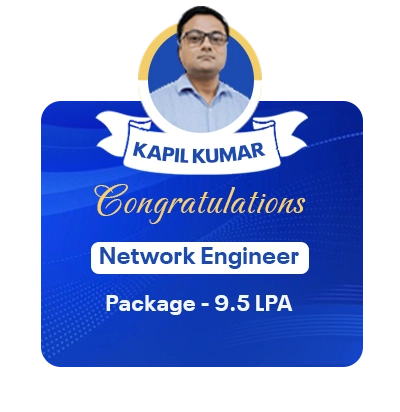
Our Recently Placed Students
Frequently Asked Questions
The Windows Administration course by Rexton IT Solutions will help you learn the relevant skills that are in high demand among recruiters. Also, there are multiple job opportunities and promising career growth.
You only need to know basic IT and computer knowledge to take this course. However, there are no formal requirements. Therefore, if you want a career in the IT sector but do not have an IT background, you can enroll in our beginner-friendly Windows Server Administration course.
There are no strict time constraints for this course, and it is a completely self-paced course. You can dedicate any number of hours to learning. However, dedicating at least 2-3 hours per day is considered productive.
The benefits of taking an online Windows Server course include:
- Learn from anywhere without relocating or commuting
- Flexible schedules suited for working professionals and students
- Hands-on virtual labs for real server configuration practice
- Recorded sessions for revision and self-paced learning
- Cost-effective compared to classroom training
- Up-to-date curriculum aligned with current Windows Server versions
